
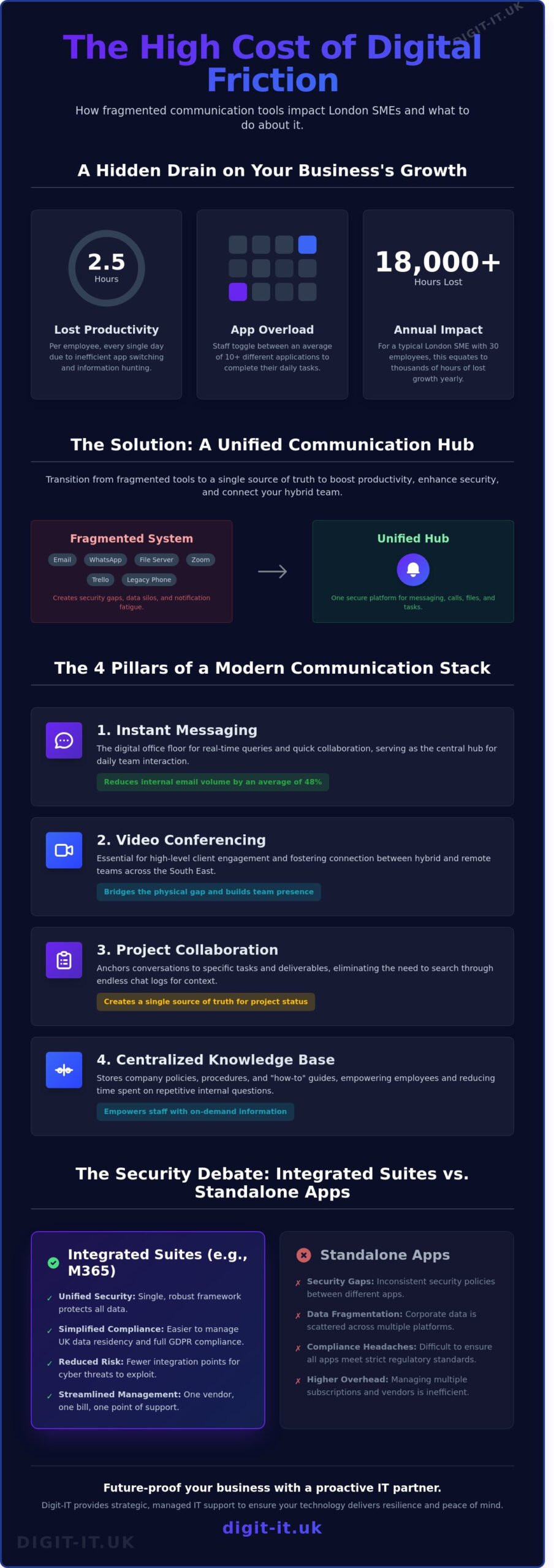
Your business is likely losing 2.5 hours of productive time per employee every single day because your staff are toggling between 10 different apps to find one document. For a London SME with 30 employees, that’s over 18,000 hours of lost growth every year. Relying on a fragmented mix of WhatsApp and outdated email threads doesn’t just drain morale; it creates massive security gaps that 2026’s sophisticated cyber threats will exploit. Choosing the right team communication tools isn’t about following digital trends. It’s about building a resilient, managed infrastructure that protects your UK data residency while keeping your Hertfordshire team connected.
You’ve probably noticed that as your hybrid team expands, notification fatigue only worsens, leaving you concerned about GDPR compliance and fragmented information. We believe your technology should act as a proactive partner in your success, not a source of constant friction. Discover how to streamline your business operations and secure your data using the most effective team communication tools for the modern UK workplace. We’ll examine the top-tier platforms that bridge the gap between human talent and digital efficiency, ensuring your firm is future-proofed for the years ahead.
Key Takeaways
- Understand why transitioning from traditional email to unified digital hubs is essential for maintaining operational agility in the 2026 London business landscape.
- Identify the four essential software categories required to facilitate seamless interaction and professional video conferencing across the South East.
- Evaluate the security implications of integrated suites versus standalone apps to ensure your team communication tools remain fully GDPR compliant.
- Learn how to conduct a strategic audit of your current workflows to identify technical bottlenecks and implement solutions that align with your existing infrastructure.
- Discover the benefits of a proactive partnership to future-proof your communication stack and ensure your technology delivers long-term resilience and peace of mind.
What Are Team Communication Tools and Why Do They Matter for London SMEs?
Team communication tools are digital ecosystems designed to facilitate both synchronous, real-time messaging and asynchronous interaction within a professional framework. By 2026, the traditional reliance on fragmented email chains has largely vanished for high-performing firms. Modern SMEs now utilise unified hubs that act as a single point of entry for all corporate data and dialogue. These platforms ensure that information flows effortlessly across a business, regardless of where individual contributors are located.
London businesses face specific pressures that make these tools a necessity rather than a luxury. High transport costs and the continued expansion of commuter boundaries mean that many Hertfordshire-based employees now favour permanent hybrid models. Maintaining a consistent professional brand image requires technology that bridges the physical gap between a home office in St Albans and a client meeting in Canary Wharf. Without robust team communication tools, the risk of silos and misinformation increases, potentially damaging the client experience and internal morale.
Strategic communication builds business resilience. When a firm has a clear digital infrastructure, it can pivot quickly during market shifts or technical disruptions. We view these tools as the central nervous system of your organisation. They don’t just send messages; they protect your operational continuity and ensure your team remains a cohesive unit even when they’re miles apart.
The Problem with “App Overload”
Digital fatigue is a genuine threat to productivity. A 2025 study by the Digital Productivity Institute found that the average SME employee loses 2.1 hours daily to context switching. This occurs when staff jump between disconnected platforms for chat, file sharing, and project tracking. For a small business in Hemel Hempstead with 20 employees, managing six separate software subscriptions can cost upwards of £8,500 annually in licensing alone. Establishing a single source of truth is essential. It eliminates the “where did I see that?” anxiety and ensures everyone works from the same data set.
Beyond Chat: Unified Communications
Modern team communication tools have evolved far beyond simple chat boxes. Unified communications integrate Voice over IP (VoIP), high-definition video, and instant messaging into one seamless interface. This allows a London-based consultancy to maintain a local 0203 or 0207 phone number while their consultants work from various locations across the Home Counties. Presence indicators are now vital for managing distributed teams. These status markers show if a colleague is “available,” “in a deep work session,” or “on the school run,” which helps manage expectations without the need for constant check-ins. You can see how these systems integrate with broader infrastructure by exploring our managed IT services. Technology is only as effective as the strategy behind it, and we ensure your tools empower your human talent.
The 4 Essential Categories of Communication Software
Selecting the right team communication tools requires a strategic approach that balances immediate response with the need for deep, focused work. We categorize these digital solutions into four distinct pillars to ensure your Hertfordshire or London business remains agile and resilient. Instant messaging platforms like Slack or Microsoft Teams serve as the digital office floor. They reduce internal email volume by an average of 48 percent; allowing your team to resolve minor queries without clogging up priority inboxes. This immediate feedback loop is vital for fast-paced SMEs managing tight deadlines.
Video conferencing has evolved from a basic necessity into a core component of high-level client engagement. For firms across the South East, virtual meetings bridge the physical gap between remote talent and central London hubs, fostering a sense of presence that text cannot replicate. Project collaboration software takes this a step further by anchoring conversations to specific tasks. Instead of searching through endless chat logs, your staff finds context directly within the project board. Finally, centralized knowledge bases act as your company’s single source of truth. Storing policies and “how-to” guides centrally reduces the time spent on repetitive internal enquiries by approximately 30 percent, according to 2025 industry benchmarks.
Synchronous vs. Asynchronous Tools
Your team’s daily productivity depends on knowing when to talk and when to type. Synchronous tools like live chat are perfect for urgent issues, but they’re often intrusive. Asynchronous communication, such as recorded video updates or shared cloud documents, allows employees to process information on their own schedule. We recommend creating a formal communication charter for your Buckinghamshire office. This document defines which channels to use for specific scenarios, ensuring that high-value tasks aren’t constantly interrupted by notification fatigue.
The Role of VoIP in Modern Communication
Traditional landlines are now a legacy technology. Following the UK’s full transition away from the PSTN network, cloud-based Voice over IP (VoIP) is the standard for any London SME focused on growth. These systems allow your team to manage professional business calls from any device, whether they’re in a home office or on-site with a client. VoIP doesn’t just replace the desk phone; it integrates with your existing team communication tools to create a unified digital environment. By linking your phone system to your CRM, you provide a seamless experience that your clients will notice. You can explore our VoIP phone systems to see how integrated audio can future-proof your business continuity plans.
Microsoft 365 vs. Standalone Apps: The Security Debate
Choosing between a “best-of-breed” stack and an integrated suite is a pivotal decision for Hertfordshire business owners. While a combination of Slack, Zoom, and Dropbox offers specialised features, this fragmented approach often creates dangerous security silos. A 2025 study found that SMEs using more than four separate team communication tools are 45% more likely to experience a data leak compared to those on a unified platform. This happens because data governance becomes inconsistent when spread across different vendors with varying privacy policies.
GDPR compliance relies on your ability to track, export, and delete data upon request. Managing these obligations within a single ecosystem like Microsoft 365 is significantly more efficient than auditing three or four separate platforms. Fragmented systems also invite “Shadow IT,” where staff use personal, unencrypted apps to bypass cumbersome corporate tools. This creates blind spots that no IT manager can secure. By centralising communication, you regain visibility and ensure that sensitive client data stays within your controlled perimeter.
The Power of the Microsoft Ecosystem
An integrated workflow eliminates the “context switching” that costs employees up to four hours of productivity per week. When you use Teams, your files live in SharePoint and your meetings sync with Outlook automatically. This creates a seamless loop where security settings follow the user, not just the app. For Herts SMEs with remote staff, Microsoft Intune provides the necessary resilience by securing data on employee-owned mobile devices. You can learn more about optimising your setup in our Microsoft 365 management guide.
Cyber Security and Communication
London SMEs are high-value targets for cyber criminals. In 2024, phishing attacks via team communication tools rose by 28% in the capital. These attacks often bypass traditional email filters by appearing as trusted internal messages. Implementing Multi-Factor Authentication (MFA) across all platforms is your first line of defence. However, a single-suite approach allows for proactive threat hunting; if one account is compromised, you can lock down the entire environment instantly rather than chasing a breach across separate Slack or Zoom accounts. This level of control is what defines a future-proof business strategy.
Implementing New Tools: A Guide for Hertfordshire Business Owners
Deploying new team communication tools requires more than a simple software download. A successful rollout begins with a rigorous audit of your current digital behaviour. Data from the 2025 SME Digital Adoption report shows that 42% of Hertfordshire firms suffer from “tool sprawl,” where redundant apps actually decrease productivity by 15% annually. You must identify specific bottlenecks, such as delayed client responses or fragmented project files, before committing to a new platform.
Your chosen solution must align with your existing managed infrastructure and security protocols. Proactive business owners ensure their stack meets Cyber Essentials standards to maintain resilience. Once the technical foundation is set, launch a pilot programme with a “champion” group of five to ten influential staff members. This group provides the initial feedback loop needed to refine settings before the full 2026 rollout begins. This methodical approach ensures that the complex world of IT feels manageable and advantageous for your staff.
Overcoming Team Resistance
Staff often view a new platform as a burden. Address the “not another app” objection by highlighting how the tool removes specific daily frustrations. For teams operating across Buckinghamshire, making the transition rewarding is vital. You might offer small incentives for the first department to reach 100% profile completion. A gradual migration over a four-week period is more effective than an overnight switch, as it allows users to build confidence without feeling overwhelmed by a sudden change in their workflow.
Training for Success
Generic manuals don’t work for busy SMEs. Create short, three-minute video guides or host local 20-minute “lunch and learn” sessions. Ongoing support beats a one-off workshop every time; 68% of employees retain digital skills better when they have access to a searchable internal knowledge base. Your training should also define your “rules of engagement.” This ensures your team communication tools reflect your unique company culture, whether that is a focus on rapid responses or protected deep-work periods.
Continuously monitor usage metrics and gather monthly feedback to optimise the system. If a feature isn’t being used after 90 days, it’s likely a distraction that needs removing or re-training. This proactive maintenance keeps your business agile and future-proof.
Future-Proofing Your Business with Managed IT Support
A suite of team communication tools is only as effective as the infrastructure supporting it. In 2026, simply installing software isn’t enough to maintain a competitive edge in London or Hertfordshire. You need a cohesive strategy that aligns your digital tools with your business objectives. Digit-IT operates as a seamless extension of your internal team, ensuring your technology remains an asset rather than a liability. We focus on the long-term resilience of your systems, allowing you to concentrate on growth while we manage the technical complexities.
The next twelve months will see a surge in AI-driven collaboration and sophisticated VoIP integrations. These advancements promise to automate routine scheduling and provide real-time sentiment analysis during client calls. However, these features require robust management to prevent data silos. Our proactive partnership model ensures your communication stack is integrated, updated, and ready for these shifts before they become industry standards.
The Strategic Advantage of Managed Services
Downtime is expensive. Research indicates that IT outages cost UK small businesses an average of £3,600 per day in lost productivity and missed opportunities. We mitigate this risk through a dedicated helpdesk that resolves issues with your team communication tools before they disrupt your workflow. Our team provides more than just reactive fixes; we deliver a shield for your business continuity.
Security is our baseline. We conduct regular security audits to ensure your private team chats and sensitive documents stay protected and compliant with UK data regulations. By choosing our comprehensive IT services, London businesses gain access to enterprise-level security that scales as they grow. We prioritize proactive monitoring, which identifies vulnerabilities in your network infrastructure long before a breach can occur.
- Proactive monitoring to stop 99% of common connection drops.
- Cyber Essentials aligned audits for total peace of mind.
- Bespoke VoIP configurations tailored to hybrid London workforces.
Your Next Steps for Better Communication
Evaluating your current setup is the first step toward a more efficient 2026. We offer a free IT health check to identify bottlenecks in your current software and hardware. Many businesses find they’re paying for redundant features or using outdated protocols that slow down their internal collaboration. Our assessment provides a clear picture of where you stand and where you can improve.
Success requires a technology roadmap. McKinsey reports that 70% of digital transformations fail when they lack a structured plan. We work with you to build a roadmap that accounts for your specific needs in the local UK market. Choosing a partner who understands the nuances of the London and Hertfordshire business landscape ensures your support is relevant and responsive. Don’t leave your connectivity to chance; invest in a partnership that values your business resilience as much as you do.
Securing Your Competitive Edge for 2026
Selecting the right team communication tools isn’t just about chat features; it’s about building a resilient infrastructure that protects your data. Whether you’re integrating the full Microsoft 365 suite or deploying specialized standalone apps, your choice dictates your firm’s agility across London and Hertfordshire. Successful implementation relies on a proactive security strategy rather than just installing software. With 24/7 proactive technical support and 20+ years of expert IT consultancy, Digit-IT ensures your systems remain operational and secure against evolving threats.
Our specialists focus on London SME cyber security to bridge the gap between human talent and digital efficiency. You don’t have to navigate these technical complexities alone. By partnering with a dedicated team, you can transform your communication from a potential vulnerability into a strategic advantage. Optimise your team communication with Digit-IT today and ensure your business is ready for whatever the digital landscape brings next. Your path to a more connected and protected workplace starts with a single strategic decision.
Frequently Asked Questions
What are the best free team communication tools for small businesses?
Slack and Microsoft Teams offer the most robust free tiers for London startups looking to scale without immediate overhead. Slack’s free version provides 90 days of message history, while Microsoft Teams (Free) includes 5GB of cloud storage per user. These platforms serve as excellent entry points, but you’ll likely need to upgrade once your headcount exceeds 10 employees to maintain a full audit trail.
How do I ensure our team communication is GDPR compliant in the UK?
You ensure compliance by selecting tools that offer UK-based data residency and signing a formal Data Processing Agreement (DPA). Verify that your chosen team communication tools carry ISO 27001 certification to meet the standards set by the Data Protection Act 2018. Since 2024, the Information Commissioner’s Office has increased scrutiny on shadow IT, so centralizing all chat data is vital for your legal security.
Is Microsoft Teams better than Slack for a small London-based business?
Microsoft Teams is generally the more strategic choice for businesses already running on the Microsoft 365 ecosystem. Statistics from 2025 show that 85% of UK SMEs prefer Teams because it integrates directly with Excel and Outlook, reducing monthly subscription fragmentation. Slack remains a favorite for creative agencies in Shoreditch due to its flexible API, but it often costs 30% more per seat than a bundled Microsoft license.
Can team communication tools replace email entirely?
These tools can reduce internal email volume by approximately 70%, but they won’t eliminate the need for formal external correspondence. While chat is perfect for rapid tactical updates, 92% of UK B2B contracts are still finalized via email to ensure a permanent, legally recognized record. Use your team communication tools for internal agility and reserve email for client-facing milestones and formal documentation.
How much does it cost to implement a professional communication system?
A professional implementation typically costs between £4.90 and £15.00 per user, per month. For a Hertfordshire firm with 20 employees, this represents an annual investment of roughly £1,176 for the base infrastructure. This proactive spend is minimal compared to the £4,200 average cost of a data breach for small firms, making it a necessary pillar of your business resilience strategy.
What is the most secure way for my team to share files while chatting?
The most secure method is sharing links to files stored in encrypted cloud environments like SharePoint or OneDrive rather than uploading raw attachments. These platforms utilize AES 256-bit encryption to protect your intellectual property. Avoid consumer-grade messaging apps, as 60% of data leaks in the South East originate from employees using personal accounts for professional file transfers.
Do I need a special phone system if we use Microsoft Teams?
You don’t need traditional hardware if you utilize the Teams Phone license to handle your external calls. This digital solution allows your staff to answer 020 or 01923 landline numbers directly from their laptops or mobile devices. It eliminates the need for physical handsets that typically cost £500 per unit, providing a seamless transition for hybrid teams working between London and Hertfordshire.
How can I stop my team from being overwhelmed by notifications?
You can prevent notification fatigue by enforcing “Quiet Hours” and using the “Focus Mode” settings available in modern tools. Research from late 2024 indicates that employees lose 23 minutes of deep work productivity after every unplanned interruption. Setting strict channel naming conventions and limiting @channel mentions ensures your team stays focused on high-value tasks rather than reacting to constant digital noise.

