
Last Tuesday, a Finance Director in St Albans nearly authorised a £42,500 transfer after receiving what looked like a routine invoice from a long-term supplier. The email used perfect grammar, the correct company branding, and even referenced a genuine project meeting from the previous day. This wasn’t a crude, generic scam; it was a highly sophisticated, AI-enhanced attack designed to bypass traditional filters. Understanding what is a phishing email example in this new era is no longer optional for business owners in London and Hertfordshire. It’s the critical difference between a standard morning and a catastrophic operational shutdown.
You likely already feel that your inbox has become a digital minefield, where even your most diligent staff can be fooled by these increasingly realistic forgeries. We’re here to replace that anxiety with a proactive strategy that ensures your business resilience remains absolute. This guide provides the clear visual examples you need to recognise the specific threats targeting UK SMEs in 2026. We’ll walk through a tactical checklist to identify fake emails and provide the technical clarity required to keep your operations secure and your team confident.
Key Takeaways
- Identify why SMEs in London and Hertfordshire remain high-value targets and how to define the evolving landscape of social engineering in 2026.
- Review a detailed what is a phishing email example, such as a fraudulent HMRC alert or fake invoice, to safeguard your finance department from UK-specific scams.
- Master the ‘Hover Test’ and learn to spot subtle character swaps in sender addresses to identify malicious links before they compromise your network.
- Establish a robust response protocol to ensure immediate device isolation and credential security should a member of your team inadvertently click a suspicious link.
- Discover how proactive monitoring and managed firewalls provide the resilience needed to future-proof your business against sophisticated cyber threats.
The Anatomy of Phishing in the UK Small Business Landscape
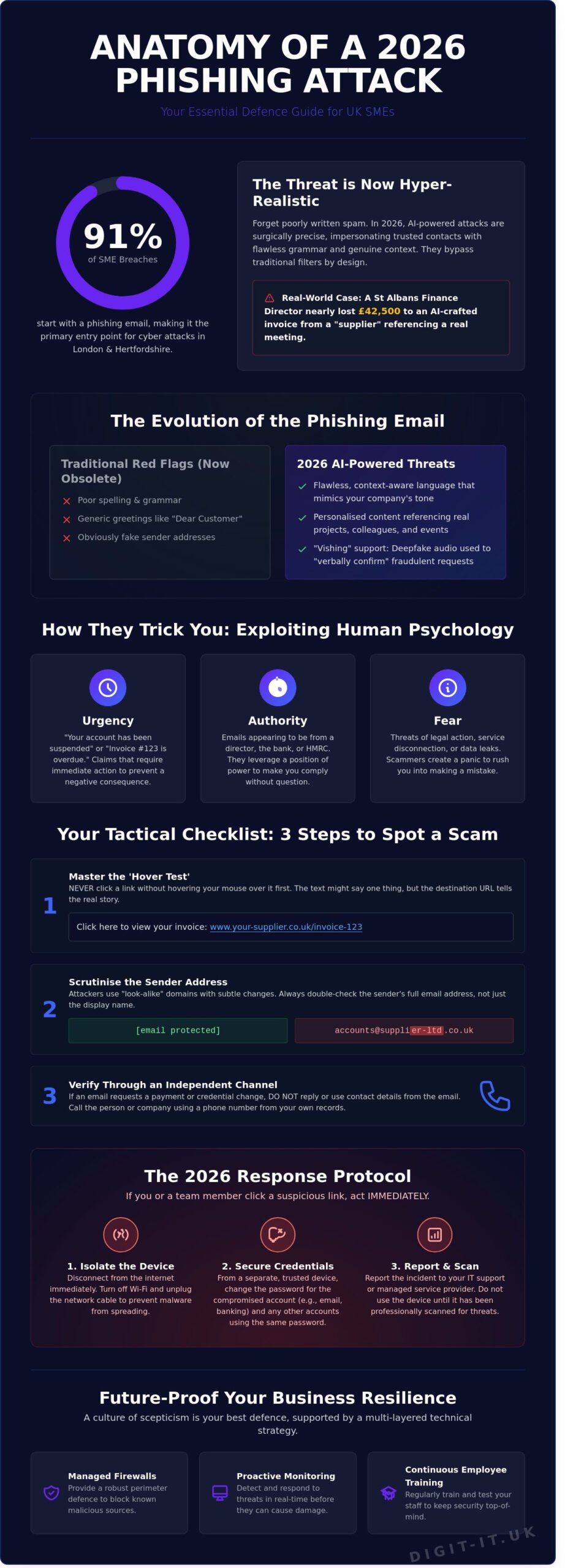
To understand the threat, we first need to define what is a phishing email. It’s a calculated act of social engineering where cybercriminals impersonate trusted brands, banks, or colleagues to harvest credentials. By 2026, these attacks have become the primary entry point for 91% of cyber breaches affecting SMEs in London and Hertfordshire. The days of generic, poorly written spam are over. Criminals now study local business networks to craft messages that feel authentic, urgent, and personal.
We’ve seen a decisive shift from “spray and pray” tactics to surgical spear phishing. A small accountancy firm in St Albans or a logistics hub in Watford is no longer a random target; they’re chosen for their specific supply chain links. For a Buckinghamshire business, the fallout from one compromised account isn’t just a technical glitch. The average cost of a data breach for a UK SME has risen to over £4,200 according to 2025 government figures, but the reputational damage often costs ten times that in lost contracts and broken trust.
Why Phishing is the #1 Threat to SMEs
Human error remains the most persistent vulnerability in any organisation. Scammers exploit this by using psychological triggers like artificial urgency or fear of account suspension. This isn’t just about stolen passwords anymore. Phishing acts as the primary delivery mechanism for ransomware attacks, effectively bypassing technical perimeters by tricking a staff member into opening the digital door. Finding a realistic what is a phishing email example is getting harder because the baits are now tailored to your specific industry and job role.
- Urgency: Claims of “unauthorised access” that require immediate action.
- Authority: Emails appearing to come from the HMRC or a company director.
- Fear: Threats of legal action or service disconnection.
The 2026 Landscape: AI and Hyper-Realism
Generative AI has fundamentally changed the game. Those classic “red flags” like spelling mistakes or odd phrasing have vanished. In 2026, AI tools generate flawless, context-aware emails that mirror your company’s tone of voice perfectly. We’re also seeing the rise of “vishing,” where deepfake audio clones a director’s voice to verify a fraudulent email request over the phone. Traditional spam filters often fail to flag these unique, one-off messages because they lack the signatures of mass-distributed scams. A modern what is a phishing email example might look exactly like a routine invoice from a supplier you’ve used for years, making proactive employee training more vital than ever.
Traditional security measures aren’t enough when the attack is designed to trick the human mind. Real resilience requires a blend of advanced filtering technology and a culture of healthy scepticism across your entire team.
5 Real-World Phishing Email Examples Every UK Business Should Know
Cyber criminals frequently refine their tactics to exploit the specific pressures of the UK commercial environment. Identifying what is a phishing email example often starts with recognising the psychological triggers attackers use to bypass your team’s critical thinking. By understanding these five common patterns, you can build a culture of resilience that protects your bottom line.
Example 1: The Urgent Unpaid Invoice
Finance departments are the primary targets for this sophisticated lure. Attackers often use look-alike domains, such as @supplier-ltd.co.uk instead of @supplier.co.uk, to send emails claiming a payment is overdue. These messages typically include a PDF attachment that, when opened, executes malicious code or leads to a credential-harvesting site. The 2024 UK Government Cyber Security Breaches Survey found that 84% of businesses identifying a breach cited phishing as the point of entry. To stay safe, always verify a suspicious invoice by calling the vendor directly using a known phone number from your internal records rather than any contact details provided in the email. Proactive avoiding phishing attacks for small businesses requires verifying every financial request through an independent channel.
Example 2: The Microsoft 365 Account Security Alert
This scam mimics the automated notifications sent by cloud platforms. It alerts the user to an “unusual login” from a distant location, pressuring them to click a “Review Activity” button. This link leads to a pixel-perfect replica of the Microsoft login page designed to steal your credentials. Once the attacker has access, they can monitor communications and intercept sensitive data. Implementing expert Microsoft 365 management ensures that multi-factor authentication and advanced threat protection are correctly configured to block these incursions before they reach your inbox.
Example 3: The HMRC/Government Grant Scam
These scams peak during January and April or following major budget announcements from the Chancellor. They often promise a tax rebate or a “Business Rates” grant, baiting owners with sums ranging from £500 to £2,500. While the email may look official, a genuine gov.uk link will never lead to a page asking for your bank details or credit card number. The lure of “free money” is a powerful psychological tool that often leads employees to ignore obvious red flags like slightly misspelled sender addresses.
Beyond these three, businesses must also remain vigilant against:
- CEO Fraud: An email that appears to come from your Managing Director requesting an urgent bank transfer for a “confidential project.”
- Localised Borough Scams: Fake emails targeting firms in London or Hertfordshire claiming a rebate is due on their Council Tax or business premises rates.
When your team asks what is a phishing email example, they should be taught to look for the sense of manufactured urgency. These threats are designed to make you act before you think. If you want to future-proof your organisation against these evolving risks, consider a comprehensive security audit to identify potential vulnerabilities in your current digital infrastructure.
Identifying the Red Flags: How to Spot a Scam in 2026
Recognising a threat before it breaches your network is the cornerstone of proactive resilience. In 2026, scammers have moved beyond obvious errors, making it harder to distinguish a legitimate request from a malicious one. If you are wondering what is a phishing email example that bypasses standard filters, look no further than the “Look-alike Domain” attack. Attackers register domains with subtle character swaps, such as ‘digit-it.co.uk’ versus ‘digit-lt.co.uk’. To the naked eye, these appear identical, especially on mobile screens where the font might be compressed.
The most effective tool in your arsenal remains the ‘Hover Test’. Before clicking any link, rest your cursor over it to reveal the true destination in the bottom corner of your browser. If the URL doesn’t match the sender’s stated website, it’s a trap. This aligns with the official NCSC phishing guidance, which emphasises that verifying the source is the first line of defence for UK businesses. Understanding what is a phishing email example in a real-world context helps your team move from reactive panic to a calm, strategic response.
The flaw of perfection has become a new indicator. Historically, phishing was marked by poor grammar and spelling. Today, generative AI creates flawless prose. If an email feels overly formal or lacks the specific linguistic quirks of your usual contact, treat it with caution. Always verify the ‘Call to Action’ against established business protocols. No legitimate bank or vendor will ask for a password reset or a change in payment details via a direct email link without prior telephone verification.
Technical Indicators You Can Check
Scrutinise the ‘Reply-To’ header against the ‘From’ header. Scammers often spoof the visible ‘From’ address but direct replies to a different, untracked account. While 83% of modern attacks now use some form of personalisation, generic salutations like ‘Dear Customer’ are still common in mass-scale campaigns. Pay close attention to branding. Misaligned logos, slightly off-brand colours, or low-resolution imagery often signal a fraudulent attempt to mimic trusted partners. Our security services focus on automating this detection to protect your team from these visual deceptions.
The Social Engineering Element
Scammers frequently use social engineering to research employees on LinkedIn, gathering details about your specific role and internal hierarchy. This data fuels the ‘Urgency Trap’, where a request for immediate payment or data transfer is framed as a crisis that requires bypassing standard checks. The biggest red flag is an ‘out of character’ request from senior management. If a director suddenly asks for an urgent transfer to a new supplier on a Friday afternoon, it’s almost certainly a scam. True security comes from a culture where every employee feels empowered to pause and verify.
The 2026 Response Protocol: What to Do if You Click a Link
Clicking a malicious link is a stressful moment, but your actions in the following sixty seconds determine your business resilience. In 2023, the National Cyber Security Centre (NCSC) processed more than 7 million reports of suspicious emails. If you’ve interacted with what is a phishing email example, panic is your enemy; logic is your ally. Following a structured protocol ensures that a single mistake doesn’t escalate into a company-wide breach.
- Step 1: Immediate isolation. Disconnect your device from the Wi-Fi or unplug the Ethernet cable instantly. This physical break stops malware from “calling home” to a command server and prevents lateral movement across your local network.
- Step 2: Password reset. Use a separate, clean device to change the password for the affected account. If you reuse that password elsewhere, those accounts must be updated immediately with unique, complex alternatives.
- Step 3: Internal reporting. Notify your IT department or managed service provider. Professional teams can monitor for unusual traffic patterns that might indicate an active intrusion.
- Step 4: Official reporting. Alert Action Fraud and the NCSC. These organisations use your data to map threat patterns and take down malicious infrastructure.
- Step 5: Forensic audit. Your IT partner should perform a deep scan to check for data exfiltration or hidden persistence scripts that survive a basic reboot.
Immediate Mitigation Steps
Malware often downloads silently in the background. Watch for unusual CPU spikes, your cooling fan spinning at maximum speed, or a mouse cursor that appears to move independently. While identifying what is a phishing email example helps prevent future clicks, the following steps are vital for active recovery. Always ensure Multi-Factor Authentication (MFA) is active. It acts as a final safety net even if a password is stolen. Never reply to a phishing email to confront the sender. This confirms your email address is active and monitored, which only increases the volume of targeted attacks you’ll receive.
Reporting Phishing in the UK
UK businesses have robust tools for fighting back. In Outlook or Gmail, use the ‘Report Phishing’ button to train global filters. You should also forward suspicious messages to report@phishing.gov.uk. For businesses operating across Hertfordshire and Greater London, reporting via Action Fraud is essential for police intelligence. This collective data helped the NCSC remove over 50,000 scam URLs in a single year. By reporting, you contribute to a safer digital ecosystem for every local business.
Protect your business from evolving digital threats with our comprehensive managed IT services designed for total peace of mind.
Future-Proofing Your Business with Managed Cyber Security
Relying on a DIY approach to digital safety is a gamble that SMEs in London and Buckinghamshire can no longer afford. Cybercriminals are refining their tactics; they’re no longer just sending obvious spam. According to the UK Government’s 2024 Cyber Security Breaches Survey, 50% of UK businesses experienced some form of cyber attack in the last 12 months. This highlights why understanding what is a phishing email example is just the beginning of a much larger strategy for your firm.
Proactive monitoring and managed firewalls act as your digital perimeter. These tools intercept malicious traffic before it ever reaches an employee’s inbox. We don’t just wait for a breach to happen; we actively hunt for vulnerabilities. However, technology is only half the battle. We help you build a human firewall through simulated phishing attacks. This training gives your team hands-on experience in a safe environment, ensuring they can spot what is a phishing email example in real-time without putting your data at risk. Digit-IT provides a bespoke Cyber Security subscription designed to scale with your specific business needs.
The Digit-IT Advantage for London SMEs
We act as your dedicated IT department across Hertfordshire and Greater London, removing the burden of technical management from your shoulders. Our team implements Cyber Essentials standards, a government-backed scheme that can reduce cyber risk by up to 80%. By prioritising these frameworks, we protect your reputation and your bottom line. You get 24/7 technical support, providing the peace of mind you need to focus on growth while we handle the evolving threat landscape. It’s about being a strategic partner, not just a helpdesk.
Next Steps for Your Business Resilience
Resilience starts with a professional security audit. It’s the only way to identify the gaps in your current setup. We often find that combining data backup and recovery with robust security creates the strongest safety net. If a breach occurs, having a verified recovery plan ensures your business stays operational. This multi-layered approach ensures that a single mistake doesn’t lead to total downtime. Don’t leave your continuity to chance. Contact Digit-IT today for a comprehensive cyber security audit.
Build Digital Resilience for Your Business Future
Cyber threats in 2026 have moved beyond simple typos and generic greetings. As London and Hertfordshire SMEs face increasingly sophisticated social engineering, recognizing what is a phishing email example becomes a vital first line of defence. You’ve seen how attackers leverage local context and urgency to bypass traditional filters. Relying on employee intuition isn’t enough when official UK government data confirms that high volumes of businesses face persistent digital threats; the stakes for your continuity have never been higher.
Digit-IT brings over 20 years of experience to your corner, acting as a strategic partner rather than just a service provider. We offer proactive 24/7 threat detection and monitoring to ensure your operations remain seamless. Whether you need tailored security solutions for Buckinghamshire businesses or comprehensive coverage across the capital, our team provides the peace of mind you need to focus on growth. Don’t wait for a breach to test your resilience.
Secure your business with a professional cyber security audit from Digit-IT and ensure your team stays one step ahead of the scammers. Together, we’ll future-proof your digital infrastructure.
Frequently Asked Questions
Is it safe to open a phishing email if I don’t click any links?
Opening a phishing email is generally safe as long as you don’t click links or download attachments, but it’s still a risk. Simply opening the message can alert the sender that your email address is active through hidden tracking pixels. According to the 2023 Cyber Security Breaches Survey, 79% of UK businesses identified phishing as their most common threat, so it’s best to delete suspicious mail immediately to maintain your business resilience.
Can a phishing email infect my computer just by being opened?
It’s highly unlikely for a modern, patched system to be infected just by opening an email, though it isn’t impossible. Sophisticated “zero-click” exploits can target specific vulnerabilities in your email client or browser to execute code without your interaction. To optimise your security, ensure your software is updated to the latest version. The NCSC reports that outdated software remains a primary entry point for 15% of successful breaches in the UK.
What happens if I enter my password into a phishing site?
If you enter your password, attackers gain immediate access to your account and can begin a lateral move through your network. This is a classic case of what is a phishing email example where the goal is credential harvesting. Once they have your login, they can exfiltrate data or deploy ransomware. This leads to an average cost of £1,100 for small UK businesses per successful attack, according to recent government data.
How can I tell the difference between a real HMRC email and a fake one?
HMRC will never use email to inform you of a tax rebate or ask for personal financial details. Genuine HMRC communications will usually direct you to sign in to your official Government Gateway account via their secure portal. In 2023, HMRC received over 130,000 reports of suspicious tax refund emails from the public. Always verify the sender’s address for subtle misspellings or unusual domains that don’t end in gov.uk.
Does Multi-Factor Authentication (MFA) stop phishing attacks?
MFA provides a vital layer of proactive protection, but it doesn’t stop phishing attacks entirely. While Microsoft research suggests MFA blocks 99.9% of automated account hacks, sophisticated attackers use “MFA fatigue” or transparent proxies to bypass these checks. We recommend using hardware keys or authenticator apps rather than SMS codes to future-proof your organisation’s digital infrastructure against these evolving tactics. It’s about building layers of security rather than relying on one tool.
What is the ‘Hover Test’ and how do I use it on a mobile device?
The hover test involves placing your cursor over a link to preview the actual destination URL before you click it. On a mobile device, you can achieve this by performing a “long-press” on the link, which triggers a pop-up showing the real web address. This simple check is essential because a common what is a phishing email example involves masking a malicious site with a friendly, familiar-looking display name to trick busy employees.
How often should I train my staff on phishing recognition?
You should conduct phishing simulation training at least once every 90 days to ensure your team remains vigilant. Research from the Ponemon Institute indicates that regular training can improve employee catch rates by up to 40% over a single year. This consistent approach turns your staff into a proactive human firewall. It provides a seamless layer of security that complements your technical managed infrastructure and protects your long-term business continuity.
Are Mac users safe from phishing emails?
Mac users are just as vulnerable to phishing because these attacks target human psychology rather than software vulnerabilities. While macOS has robust built-in security, it can’t prevent a user from voluntarily entering credentials into a fraudulent website. In 2022, Jamf reported that 31% of organisations with Mac fleets experienced a successful phishing attack. This proves that platform choice doesn’t replace the need for strategic security awareness and a proactive defense-in-depth strategy.