
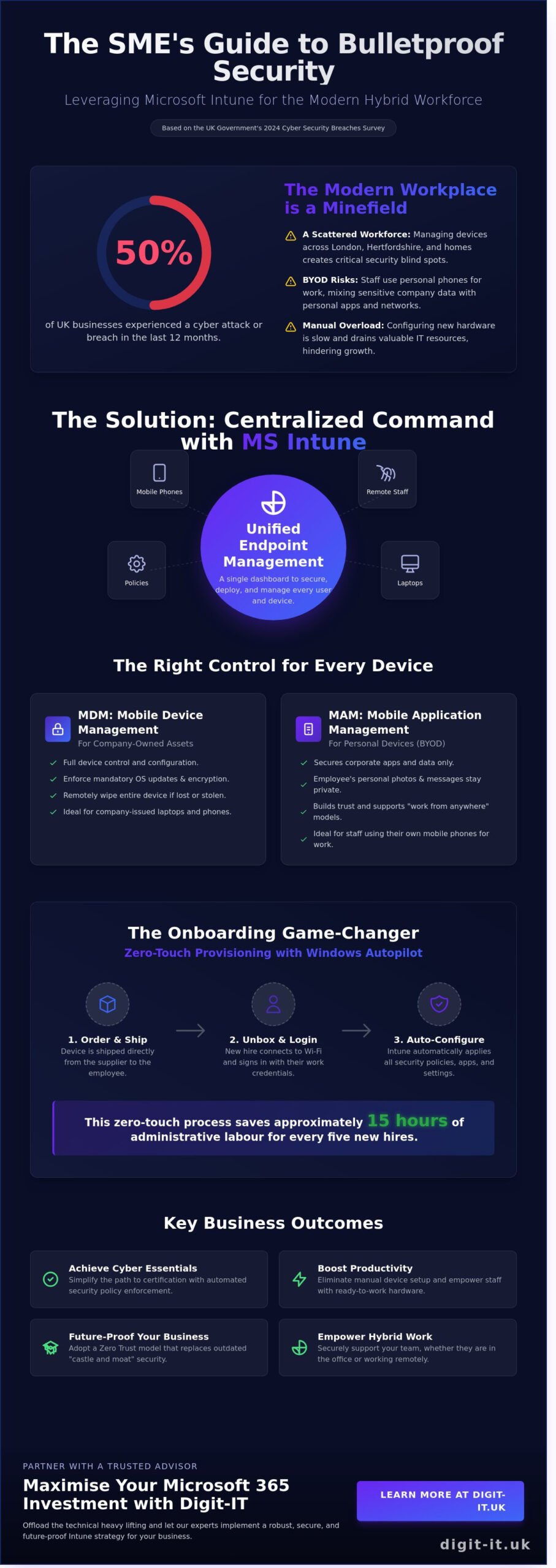
According to the UK Government’s 2024 Cyber Security Breaches Survey, 50% of UK businesses experienced a cyber attack in the last 12 months, which is why many SMEs are now turning to ms intune to harden their digital perimeters. You likely understand the anxiety of managing a hybrid workforce where company laptops and personal phones are scattered across Hertfordshire and London. It’s a constant challenge to maintain visibility when staff use their own devices for work, and the manual process of configuring hardware for new starters often drains valuable hours from your working week.
This guide explains how to leverage Microsoft’s management tools to create a secure, compliant digital environment that aligns with Cyber Essentials standards. You’ll discover how to automate device deployment and gain the peace of mind that comes from knowing you can remotely wipe sensitive data the moment a phone is reported lost. We’ll explore the strategic benefits of cloud-based management and how to future-proof your infrastructure to ensure your business remains resilient and productive through 2026.
Key Takeaways
- Understand how ms intune acts as a central hub for your hybrid workforce, ensuring every device in London or Hertfordshire remains secure and compliant without manual intervention.
- Discover how Windows Autopilot can revolutionise your onboarding process by deploying pre-configured hardware directly to staff across the Home Counties.
- Learn to strengthen your firm’s digital resilience and simplify the path to Cyber Essentials certification through automated security policy enforcement.
- Gain a clear, strategic roadmap for auditing your infrastructure and defining user personas to future-proof your business operations.
- See how partnering with a local “Trusted Advisor” allows you to maximise your Microsoft 365 investment while offloading the technical heavy lifting.
What is MS Intune? Securing the Modern Workforce in Hertfordshire and London
In the current business environment, your office isn’t just a physical location in St Albans or a floor in a London skyscraper. It’s wherever your team happens to be. Microsoft Intune is a cloud-based Unified Endpoint Management (UEM) solution that ensures this flexibility doesn’t compromise your security. By acting as the control centre for your organisation’s digital estate, ms intune allows you to manage every device that accesses your corporate data, from laptops and tablets to mobile phones.
Digit-IT views this technology as a cornerstone of business resilience. By 2026, over 70% of UK professional service firms have adopted “work from anywhere” models, making traditional perimeter-based security obsolete. Within the Microsoft 365 ecosystem, this tool provides the oversight needed to protect sensitive information without hindering productivity. It secures company-issued hardware and personal devices (BYOD) with equal precision, ensuring your team stays connected and protected regardless of their postcode.
The Evolution of Endpoint Management in 2026
The days of relying on local domains and physical server rooms are fading. Ten years ago, IT management was tethered to the office network. Today, London businesses are moving away from local Active Directory setups in favour of cloud-first architectures. This shift is driven by the Zero Trust model, which assumes every access request is a potential threat until verified. By implementing ms intune, you establish a proactive security posture that verifies every user and device before granting access to your managed infrastructure. This approach eliminates the “castle and moat” strategy of the past, replacing it with a dynamic, identity-driven security layer.
MDM vs. MAM: Understanding the Basics
Effective management requires a nuanced approach to hardware and software. Mobile Device Management (MDM) gives you full control over company-owned assets, allowing for remote wipes or policy enforcement if a laptop is stolen in King’s Cross. Mobile Application Management (MAM) focuses solely on the work-related apps. This is ideal for personal phones, as it secures work emails and documents while leaving the employee’s private photos and messages untouched. This distinction builds trust with your workforce while maintaining a robust wall around your corporate data, ensuring privacy and security coexist seamlessly.
Core Capabilities of Microsoft Intune: Beyond Simple Device Management
Microsoft Intune transforms how businesses handle hardware by moving away from reactive troubleshooting toward proactive resilience. By utilizing ms intune, your leadership team gains a centralised dashboard to enforce critical security policies across every mobile phone, tablet, and laptop in the company. This includes mandatory BitLocker encryption, strict password complexity, and automated software updates that close security gaps before they can be exploited. For firms handling sensitive client information, the integration with Microsoft Purview adds a layer of advanced data protection, ensuring that classified files remain within the corporate boundary.
Managing the lifecycle of applications becomes a background task rather than a manual burden. Instead of individual installs, software is distributed and updated silently across the entire fleet. By following a structured approach like Implementing Intune: A Strategic Roadmap, businesses can transition from fragmented systems to a unified digital infrastructure that supports sustainable growth.
Zero-Touch Provisioning for Hybrid Teams
The traditional method of setting up a new starter involves shipping a laptop to an office, having an IT technician spend 4 hours configuring it, and then couriering it to the employee. This process is outdated. With Windows Autopilot and ms intune, a new hire in Hertfordshire can receive a shrink-wrapped laptop directly from the supplier. Once they connect to Wi-Fi and log in with their corporate credentials, the device self-configures.
This zero-touch approach saves business owners approximately 15 hours of administrative labour for every five new hires. For fast-growing London startups, this reduces the “time-to-productivity” from days to minutes. It ensures that your talent is focused on their roles immediately, rather than waiting for software patches to download. This level of efficiency is a cornerstone of our managed IT services, designed to keep your operations lean and agile.
Compliance and Threat Protection
Intune acts as a digital gatekeeper through “Conditional Access” protocols. Before a device is allowed to sync with Outlook or Teams, the system checks if it is “healthy.” If a laptop in Buckinghamshire is running an outdated operating system or lacks active antivirus, access is denied until the issue is resolved. This prevents a single compromised device from becoming an entry point for a wider network breach.
The physical risks of operating in the city are also addressed. If a company phone is left in a taxi or a laptop is stolen from a cafe, the Remote Wipe feature allows your team to erase all corporate data in under 60 seconds. Looking ahead to 2026, Microsoft is embedding AI-driven insights into the platform to provide proactive threat detection. These tools will identify unusual device behaviour patterns, such as data being accessed at 3:00 AM from an unusual location, and automatically isolate the device to protect your business continuity.
The Business Case: Why London SMEs Need Unified Endpoint Management
Many small business owners in London ask if enterprise-grade tools like ms intune are overkill for a team of ten or fifteen people. The reality is that cybercriminals don’t check your headcount before launching a ransomware attack. According to the UK Government’s 2024 Cyber Security Breaches Survey, the average cost of a breach for a medium-sized UK business is approximately £10,830. For a growing firm, that’s a devastating hit to the bottom line. Investing in proactive management isn’t just about security; it’s a strategic move that future-proofs your operations. Offering seamless, secure remote work also gives you a significant recruitment edge in the competitive London talent market. Top talent expects flexibility; if you can’t provide a professional, secure remote setup, they’ll go to a competitor who can.
Meeting UK Security Standards (Cyber Essentials)
Achieving the Cyber Essentials certification is now a prerequisite for many UK government contracts and corporate supply chains. Using ms intune simplifies this audit process by providing a central dashboard to verify compliance across your entire workforce. It automates critical controls such as patch management, ensuring all devices run the latest security updates within 14 days of release. It also enforces strict access control and multi-factor authentication policies. You can find more details on these specific requirements in our guide to Cyber Security for Small Business UK. By aligning your hardware management with these standards, you protect your data and build immediate trust with prospective clients.
Operational Efficiency and Cost Reduction
Centralising your device management removes the need for expensive, time-consuming on-site IT visits to offices in the City or Shoreditch. When a new hire starts, you can ship a laptop directly to their home; the device configures itself automatically the moment they log in. This zero-touch deployment saves hours of manual setup and reduces the burden on your internal team. Better asset monitoring also extends hardware life cycles by identifying performance issues before they lead to total failure. You can explore our full range of managed IT services to see how we integrate these tools into your daily operations. For a Buckinghamshire firm supporting 20 or more users, the ROI of UEM is realised through a 30% reduction in IT support tickets and the complete elimination of travel costs for manual device updates.
- Proactive Maintenance: Identify failing batteries or storage issues before they cause downtime.
- Remote Wiping: Instantly erase company data from a lost or stolen device to prevent a data breach.
- Software Deployment: Push essential applications to all staff simultaneously without manual intervention.
Implementing Intune: A Strategic Roadmap for Buckinghamshire Businesses
Deploying ms intune isn’t just a technical task; it’s a strategic shift that aligns your technology with your business objectives. For firms in Buckinghamshire and the surrounding Home Counties, a structured approach ensures that security enhancements don’t come at the cost of operational speed. We follow a methodical path to ensure your transition is seamless and your “peace of mind” is guaranteed.
Step 1: The Infrastructure Audit
Checking hardware compatibility is the foundational move for London SMEs. We begin by auditing your existing fleet to ensure devices meet the minimum requirements for modern management, such as Windows 10 version 22H2 or later. This stage is critical for identifying “Shadow IT,” where unauthorised applications are used without oversight. A 2023 industry report found that 80% of employees admit to using non-sanctioned SaaS apps, creating significant security gaps. This audit serves as the essential preparation for a Microsoft 365 Management transition, ensuring your digital foundation is robust before we layer on advanced protections.
Step 2: Policy Design and Pilot Testing
Turning every security feature on simultaneously is a recipe for blocking staff productivity and creating frustration. We advocate for a phased rollout. We start by defining user personas, identifying that a field sales agent in Hertfordshire has different data access needs than a finance director in London. We then configure security baselines and compliance policies in a “Report-only” mode to see their impact without disrupting workflows.
- Pilot Group: We select a small team of “power users” (roughly 10% of your workforce) to test the initial configuration.
- Feedback Loop: We gather direct insights on the user experience before the wider deployment.
- Baselines: We apply industry-standard security templates that automatically harden your devices against 90% of common threats.
Once the pilot is successful, we enrol the remaining devices. Your team will interact primarily with the “Company Portal” app, a self-service hub where they can download approved software and check their device compliance status. This empowers staff while maintaining your control. Our role then shifts to continuous monitoring. We use ms intune reporting tools to track update adoption and policy compliance in real-time, refining rules as your business evolves and new threats emerge. This proactive stance ensures your resilience remains high without requiring constant manual intervention from your internal team.
Ready to modernise your device management? Explore our managed IT services to see how we can secure your business infrastructure.
Maximising Your Microsoft 365 Investment with Digit-IT’s Expert Management
Deploying ms intune is a significant step toward modernising your workforce, but the true value lies in how it integrates with your wider business goals. At Digit-IT, we view device management as a core pillar of a comprehensive Managed IT Support strategy. With over 20 years of experience supporting firms across London and the Home Counties, we act as your local “Trusted Advisor,” removing the technical complexity that often stalls growth. Our approach ensures your technology works for you, rather than creating additional administrative burdens for your internal staff.
We provide 24/7 proactive monitoring to catch issues before they disrupt your operations. This constant oversight offers the peace of mind that your data remains secure and your team stays productive. By choosing a partner based in Hertfordshire, you gain the advantage of rapid, localised expertise that understands the specific pressures of the UK market. We don’t just fix problems; we build resilience into your digital infrastructure.
Why Managed Intune Beats the DIY Approach
Attempting a “do-it-yourself” setup with ms intune often leads to costly misconfigurations. Industry data suggests that 60 percent of small businesses that suffer a major data breach struggle to recover within six months, and many of these breaches stem from simple policy errors. A single wrong click in a DIY setup can lock employees out of critical files or leave sensitive client data exposed to the public web.
- Digit-IT handles the technical heavy lifting, ensuring your environment remains compliant with Microsoft’s 2026 update cycle.
- We eliminate the risk of “locked out” employees by testing policies in sandbox environments before deployment.
- Our local support team provides on-site assistance in Hertfordshire and Greater London, bridging the gap between remote management and physical hardware needs.
Future-Proofing Your Business Technology
Your IT infrastructure should be a launchpad for innovation. By stabilising your device management now, you prepare your business for transformative AI tools like Microsoft Copilot. These advanced systems require a clean, well-governed data environment to function effectively. We ensure your business can scale without technical friction, adding new users and devices in minutes rather than days.
Our partnership model focuses on long-term success rather than quick fixes. We look over the horizon to identify future risks, keeping your business agile and secure in an increasingly complex digital world. Don’t leave your security to chance or settle for reactive fixes that cost more in the long run. Book your IT health check today and secure your company’s digital future with a bespoke strategy designed for growth.
Future-Proof Your Workforce with Strategic Endpoint Management
Securing a modern SME in 2026 requires more than just basic antivirus software. By implementing ms intune, your business gains a sophisticated framework to manage mobile devices and protect sensitive data across London and Hertfordshire. This proactive approach ensures your team stays productive whether they’re in a Soho office or working remotely from St Albans. You’ll reduce technical friction and strengthen your resilience against evolving cyber threats.
At Digit-IT, we’ve spent over 20 years supporting local SMEs as their dedicated technology partners. Our team of Hertfordshire-based specialists combines Cyber Essentials expertise with deep Microsoft 365 knowledge to turn complex infrastructure into a competitive advantage. We don’t just manage tools; we build secure foundations that allow your business to scale without the typical anxieties of technical failure. It’s time to move beyond reactive IT and embrace a managed environment that works as hard as you do.
Secure Your Business with Expert Microsoft Intune Management from Digit-IT
Take the first step toward total digital peace of mind today. Your business deserves a secure, seamless future.
Frequently Asked Questions about Microsoft Intune
Is Microsoft Intune included in my Microsoft 365 subscription?
Microsoft 365 Business Premium includes it at £18.10 per user per month as of current 2024 pricing. It’s also a core component of Enterprise E3 and E5 plans. If your business currently uses Business Standard, you’ll need to upgrade your licence or purchase a standalone add-on to access these management capabilities. This strategic investment ensures your security infrastructure remains robust and fully integrated.
Can Microsoft Intune manage personal iPhones or Android devices (BYOD)?
Yes, it manages personal devices through Mobile Application Management (MAM) without requiring full control of the handset. You can secure corporate data within apps like Outlook and Teams while leaving personal photos and messages entirely private. This creates a secure boundary that protects your business IP while respecting the personal privacy of your workforce. It’s a practical solution for the modern, flexible UK workplace.
Will my staff feel like I am spying on them if I use MS Intune?
Your team won’t feel monitored because ms intune is built with transparent privacy controls that limit what admins can see. It’s impossible for a business to view personal call logs, SMS messages, or web browsing history on a personal device. We recommend providing a clear policy document to your staff during rollout. This builds a culture of trust and ensures everyone understands that security doesn’t come at the cost of their privacy.
What happens if an employee leaves the company or loses their device?
You can execute a “Selective Wipe” to instantly remove all corporate emails and files while leaving personal data untouched. If a company owned laptop is stolen, a “Full Wipe” restores the device to factory settings to prevent data theft. Given that 30% of UK data breaches involve lost hardware, this rapid response capability is essential for your business continuity. It ensures your proprietary information never stays in the wrong hands.
How long does it take to set up Intune for a small business in London?
A typical deployment for a small business takes between 5 and 10 working days from initial audit to final testing. This timeline allows us to configure bespoke security profiles and ensure all your essential applications are ready for distribution. We act as an extension of your team to ensure the transition is methodical. Our goal is to deliver a proactive security posture without causing any downtime for your staff.
Do I need a server in my office to run Microsoft Intune?
You don’t need any on-site servers because Intune is a 100% cloud-based service hosted by Microsoft. This removes the need for expensive hardware maintenance and reduces your office energy consumption. By moving your device management to the cloud, you ensure your security policies reach employees whether they are in the office or working remotely. It’s a future-proof approach that supports a truly agile business model.
Can Intune help my business pass a Cyber Essentials audit?
Yes, it is a powerful tool for achieving the UK Government’s Cyber Essentials certification. ms intune automates 4 out of the 5 technical controls required for the audit, including software updates and access restrictions. By enforcing these standards across all devices, you significantly reduce your vulnerability to common cyber threats. It provides the documented evidence needed to prove your business is committed to high-level digital resilience.
What is the difference between Microsoft Intune and Autopilot?
Microsoft Autopilot is the technology used to pre-configure new devices, while Intune is the platform that manages them daily. Autopilot ensures a laptop is ready for use within 20 minutes of being unboxed by the employee. Once the device is active, Intune takes over to push out security updates and monitor compliance. They work in tandem to provide a seamless, zero-touch deployment experience for your growing team.

